Work in progress · Looking for design partners
The control plane for your AI coding harness
Publish skills and docs, add vetted MCP tools and hooks, and assign them by role, project and environment. Onion delivers the right version to every developer and coding agent, and shows why each asset was included.
Not a coding assistant. An enterprise entitlement and delivery plane for AI coding assets.
The problem
AI coding tools spread faster than governance.
Every developer wires up their own agents, skills, MCP servers and rules. The same task in the same project produces different results.
-
Security exposure
Unvetted tools and instructions run against your code with no central control.
-
Architecture drift
Each agent follows its own rules, and the codebase slowly drifts from your standards.
-
Shadow AI
Unapproved tools and MCP servers spread through personal setups that nobody can see.
-
Review overload
Unpredictable output means heavier reviews and less trust in AI-assisted changes.
How it works
One resolver decides what each agent receives.
Onion computes the effective harness for a specific situation: who is working, in which project, environment, repository and branch. Then it delivers exactly that, and nothing else.
-
01
Company catalog
Assets, versions, owners and roles, held centrally in one tenant.
- Skills
- MCP servers
- Subagents
- Agent hooks
- Managed docs
-
02
Policy resolver
Evaluates who is working and where.
- Role
- Team
- Project
- Environment
- Repository
- Branch
- Path direction
-
03
Effective harness
Only the assets this situation needs, signed as one bundle.
- Signed
- Versioned
- Assigned assets only
-
04
Developer and coding agent
Delivered by the onion CLI and daemon into each agent's native locations.
- Claude Code
- Codex
- Copilot CLI
- Copilot in VS Code
Effective harness = company baseline + project and environment extension + access policy + current scope
Build. Assign. Deliver. Govern.
- 01BuildAuthor skills that carry your playbooks, rules and docs. Curate MCP servers, subagents and agent hooks.Company level
- 02AssignMap assets to company roles and teams, then extend them per project and environment.Project level
- 03DeliverThe onion daemon pulls a signed bundle and materializes it for each coding agent.Delivery
- 04GovernAllow and deny policies, central revocation, and an explanation for every decision.Governance
Company level · Build and assign
Set roles and assets once, for the whole company.
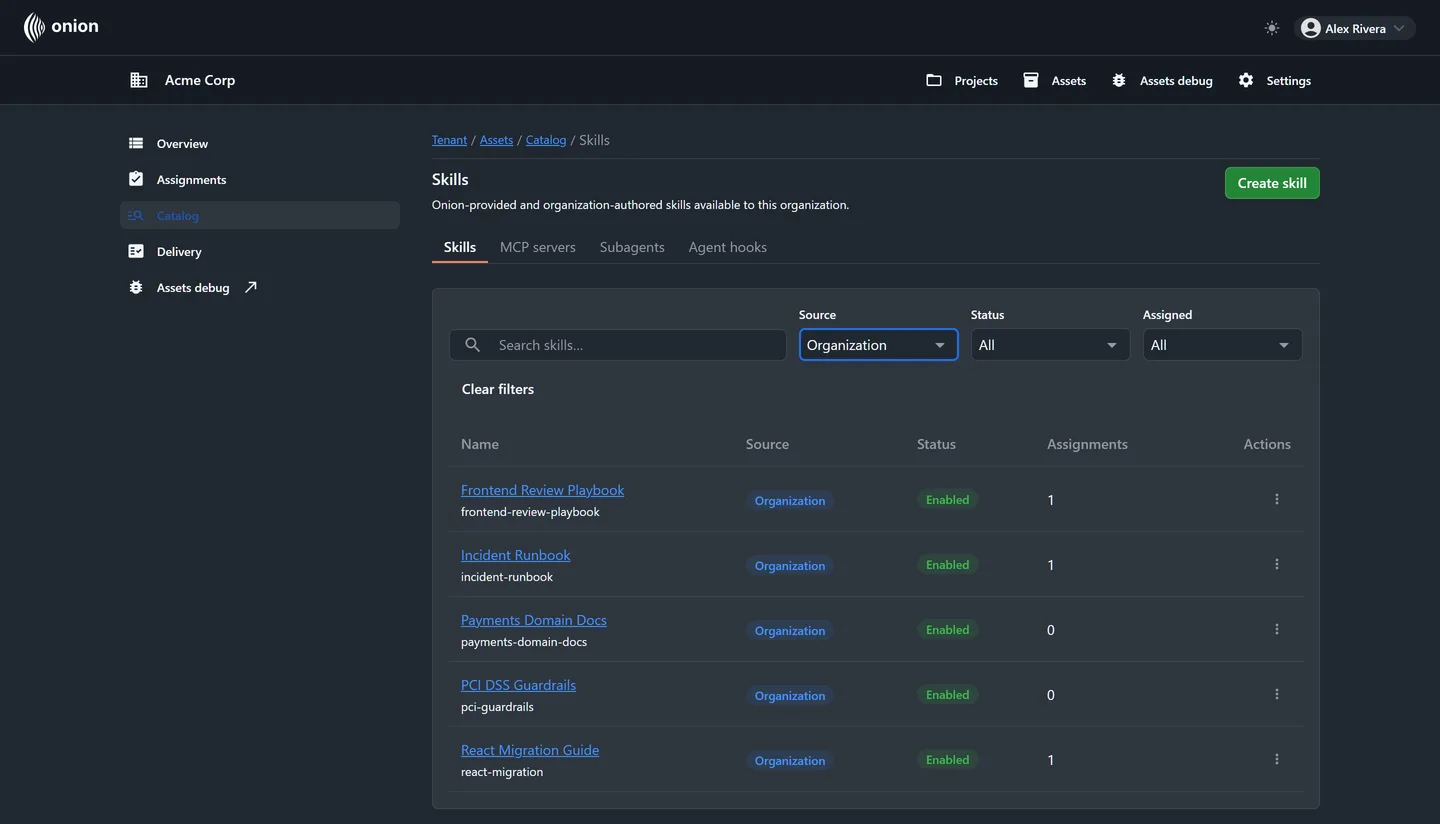
Your platform team builds the catalog: internal skills that carry your playbooks, rules and docs, alongside MCP servers, subagents and agent hooks curated in Onion. Every asset is versioned and mapped to company roles and teams.
- A role is not a repository. It is a portable profile of capabilities for a person and their agents.
- Change projects, keep your setup: company-level assignments follow the role.
- Every action in the control plane is guarded by explicit, permission-based access checks.

Project level · Extend
Projects extend the baseline without mixing contexts.
A project groups connected repositories and branches by environment. Project rules add skills on top of the company role, so payments guidance reaches payments work and nowhere else.
- Connect GitHub or GitLab repositories and observe their branches.
- Named environments, such as development, staging and production, scope what gets delivered where.
- Rules add up: a member receives every skill from every rule that matches them.

Illustrative example
Project: Payments
- Development
- checkout-api · developcheckout-web · develop
- Staging
- checkout-api · releasecheckout-web · release
- Production
- checkout-api · maincheckout-web · main
Company baseline
Role assets every developer already has
Project extension
- PCI guardrails
- Payments domain docs
- Allowed MCP servers
- Release hooks
Effective project harness
Assigned per role, environment, repository and branch
Project assets layer on top of the company role. They reach only the roles, environments and repositories they are assigned to.
Deliver
Change an asset once. Every agent gets the right version.
Update a skill from v3 to v4, change a hook, or adjust which MCP servers are allowed. Onion recomputes the effective harness, and a local daemon brings every machine up to date. No re-setup, no announcement thread.
Update
An admin publishes a new asset version in the catalog.
Resolve
The server recomputes each effective harness and signs the bundle.
Pull
The onion daemon polls over outbound HTTPS, verifies the signature, and applies changes only when something actually changed.
Work
Each coding agent picks up the new version from its native location.
$ onion link         # connect this repository to its project
$ onion seed         # materialize the effective harness now
$ onion daemon run   # keep it current in the background
$ onion doctor       # check the local setup
Works with the agents your teams already use
- Claude Code
- OpenAI Codex
- GitHub Copilot CLI
- GitHub Copilot in VS Code
Agent support is declarative, so new agents can be added without changing the delivery protocol.
Revoke centrally
When access is withdrawn, the daemon confirms the revocation and removes the files it owns, without touching files a developer has changed.
RoadmapGateway and CI checks, and a dedicated IDE extension.
Clean context
Each agent sees only what its situation needs.
Shared folders push every team's instructions to every agent. Onion scopes delivery, so assets from different teams and roles never mix by accident.
Without Onion
One shared bundle reaches everyone
- Frontend docs
- Backend MCP servers
- Security hooks
- QA playbooks
- Ops runbooks
- Legacy instructions
The agent gets everything.
With Onion
Scoped delivery for the situation
- React migration skill
- Payments domain docs
- Approved frontend MCP server
- Frontend review playbook
- PCI guardrails
Only what is relevant.
-
Less noise
Fewer irrelevant instructions mean less signal overload and less invented architecture.
-
Less IP exposure
Internal practices reach only the people and agents that need them.
-
Clean repositories
Managed assets are materialized locally and excluded from Git, so they never ride along in commits.
-
Faster onboarding
A new project starts with the right setup on day one.
Govern
Control that grows from first experiments to regulated teams.
Security teams get enforceable rules and explainable decisions, not a promise to be careful.
Design direction
Mode A
Allowed unless denied
For early adoption. Teams try agents quickly, and Onion blocks only what is explicitly unsafe.
Policy spectrum
Mode B
Denied unless allowed
For regulated enterprises. Agents see only approved tools, docs and hooks.
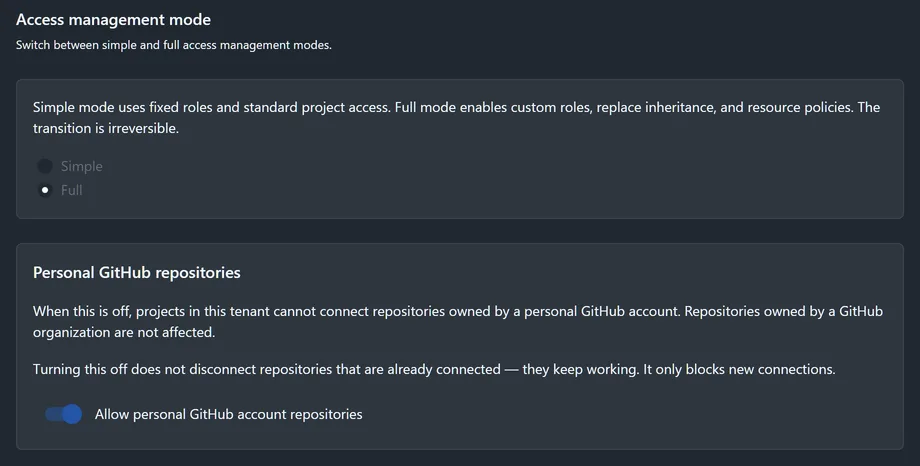
Today, assets reach agents only through explicit assignment, and Full mode adds allow and deny resource policies. Next: one tenant-wide switch that sets the default along this spectrum.
What you can enforce today
- Assets reach an agent only through explicit assignment.
- Full access-management mode adds custom roles, inheritance overrides, and allow and deny resource policies.
- A read-only debug view explains why each asset is allowed or blocked for any role, project, environment, repository and branch.
- Devices enroll once and then use short-lived credentials that rotate automatically.
- Devices and assets can be revoked centrally.
-
In progress
Audit trail
The backend already records delivery events and activation proofs. Audit records are designed to capture user and role, project and environment, repository and branch, asset versions, policy, delivery time, and hook activity. An audit UI and export come next.
-
Roadmap
Approvals
Approval gates for promoting new asset versions and changing policies.
Who it's for
Bought by leadership. Run by architects. Used by every engineer.
Onion is an enterprise capability. Buyers get control, architects get a mechanism to govern with, and engineers get a ready-made environment.
-
Buy
CTO, Head of AI, VP Engineering, Head of Platform, CISO
Reduce unmanaged AI risk with one governed rollout path.
-
Manage
Staff, AI, Platform and Security architects, Tech Leads
Define roles, assets, policies, rollout and exceptions.
-
Use
Developers, QA, SRE, AI engineers, coding agents
Get a ready AI setup for their role and project, with no manual configuration.
-
Security and AppSec
See which assets are allowed for whom, explain why each one is allowed or blocked, revoke centrally, and tighten policies as adoption grows.
-
Team leads
New developers get the right setup for their role and project automatically. No setup wiki.
-
Staff and AI architects
Roles and assets become portable, owned objects, so it is always clear who configures what.
-
Developers
Less local tinkering, less noise, and a faster start on every new project.
-
Platform teams
One delivery model for versions, hooks and integrations across every team.
-
Roadmap
Management
Adoption visibility: who uses which assets, which policies are on, and where the gaps are.
Scale
Start with one team. Grow without changing the model.
Onion can begin as a controlled AI setup for a single team. The same concepts extend to tenant-wide governance.
-
Small team
3 to 4 people
- A shared catalog
- Two or three roles
- One project and repository
- Fast onboarding
-
Scale-up
Several teams
- Roles by function
- Project extensions
- Environment, repository and branch scope
- Versioned rollout
- Explainable access decisions
-
Enterprise
Many projects
- Allow and deny policies
- Central revocation
- Delivery to multiple coding agents
- Audit trail In progress
- Approvals Roadmap
- One-switch policy modes Roadmap
Designed for enterprise scale. Large multi-project rollouts are not yet validated in production.
Status
Work in progress, stated plainly.
Onion is in active development. The control plane and local delivery pipeline already work end to end. Here is what ships today, what is in progress, and what comes next.
Shipped
- Company tenant with members, teams, roles and permission-based access control
- Projects with named environments, plus GitHub and GitLab repository connection with branch observation
- Versioned catalog: skills, MCP servers, subagents, agent hooks and managed instruction files
- Server-side resolver across role, team, project, environment, repository and branch
- Signed bundles delivered by the onion CLI and daemon to Claude Code, Codex, Copilot CLI and Copilot in VS Code
- Device enrollment with automatically rotated, short-lived credentials
- Central revocation of devices and assets
- Simple and Full access-management modes with allow and deny resource policies
- Debug view that explains every asset decision
In progress
- Audit trail: delivery events are recorded today; audit UI and export are next
- Playbooks, rules and policies as dedicated asset types (today they ship as skill content)
Roadmap
- One tenant-wide policy switch, from “allowed unless denied” to “denied unless allowed”
- Approval gates for asset versions and policy changes
- Gateway and CI checks
- IDE extension
- SSO, OIDC and SCIM
- Adoption analytics for management
- Billing and plans